How to Scan the Market Using Order Block Zones
A structured 4-step process: timeframe bias → efficient scanning → zone reaction → disciplined risk management.
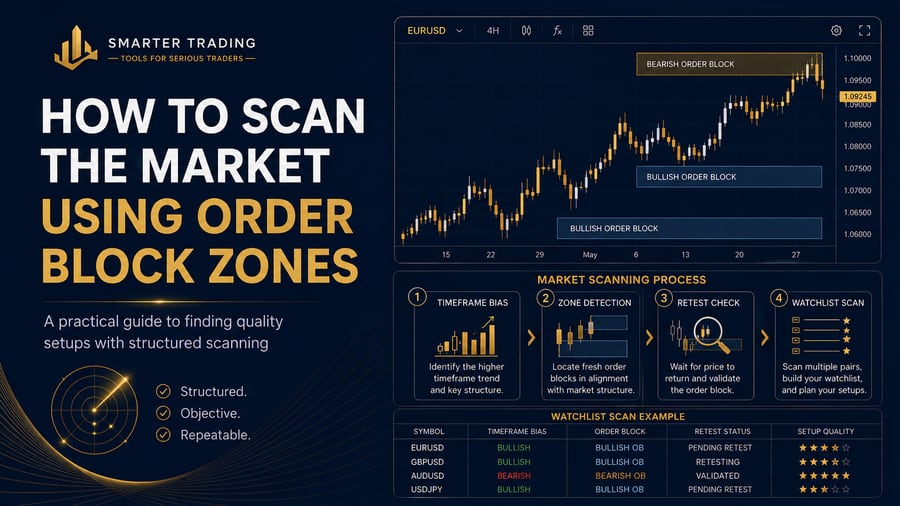
Step 1 — Timeframe Bias First
Before scanning stocks, decide bias on index / higher timeframe. If structure is messy, reduce size or skip. Scanning without bias creates random trades.
Step 2 — Efficient Scanning
Use a watchlist (Nifty basket or your swing list). A Nifty Order Block Screener helps shortlist symbols near fresh zones or retests so you open fewer charts.
- Ignore distant zones that price cannot reach today
- Prioritise fresh / unmitigated areas near price
- Keep the shortlist tiny (1–5 names)
Step 3 — Zone Reaction on the Chart
Open each shortlisted symbol. Confirm the zone still makes sense with structure. Wait for reaction — rejection, displacement, or your candle rules. No reaction = no trade.
For chart-level detail, use the SMC Order Block Indicator.
Step 4 — Disciplined Risk Management
Define invalidation outside the zone, size from risk %, set a daily loss limit, and stop when the plan is done. Scanning more symbols never fixes poor risk.
Educational tutorial only. Not personalised financial advice. F&O and equity trading involve substantial risk.